


In a typical Loquiz game, players solve a series of quizzes. In the normal settings, either they have one shot, or they have to repeat until they provide the correct answer. What if you want the middle ground? Offering the players multiple attempts.
In this article, I’ll show you step by step how it’s possible.

Current options with Loquiz
A Loquiz task is set up by default as “Remove when answered correctly/incorrectly” (in the task’s settings). This only gives one attempt to solve its riddle.

With “Keep until answered correctly”, the player needs to answer correctly to move forward. I recommend it only if the quiz is easy.
So, how do we create the possibility to make several attempts?
Loquiz Logic to allow several attempts
We’ll show you this logic using the “Demo Adventure by Loquiz“.
First, you need to duplicate your task. You can directly do it from the Creator page.

Let’s make 2 copies. So the players get 3 possible attempts to solve that riddle.


Note: You can adapt the scoring, so players get fewer points the more they attempt. 1st attempt: 10 points, 2nd attempt: 5 points, 3rd attempt: 2 points.
Now, you need to adapt the Loquiz logic to these tasks. Let’s do it:

When task 3 is finished, then we show tasks 7 and 8. We duplicated task 7 already.

Let’s add this logic: When the task 7 answer is incorrect, then we open task 11 (one of the duplicates).

We repeat it with task 12 for the third possible attempt.

Now we have this. But nothing happens if we answer incorrectly task 11 and task 12. We have to modify that logic part.

Let’s solve it:
We deactivate task 3 only if task 8 is answered correct AND if task 7 or 11 or 12 are answered correct.

Make sure that each quiz task has the option ticked “Remove when answered correctly/incorrectly”.
We’ve just built a logic that allows 3 attempts for the player to answer. If you’re still unsure about how to implement this logic, feel free to send me a message including a screenshot of your Loquiz game logic, and I’ll be happy to help!
Note: Instead of “open for answering”, we can also use “show on map” (if it’s on a map) or on a playground/list. It’s up to you.
Let’s test it
Here is the game mechanism.
For this one, I used the logic with “Show on map” instead of “Open for answering”.
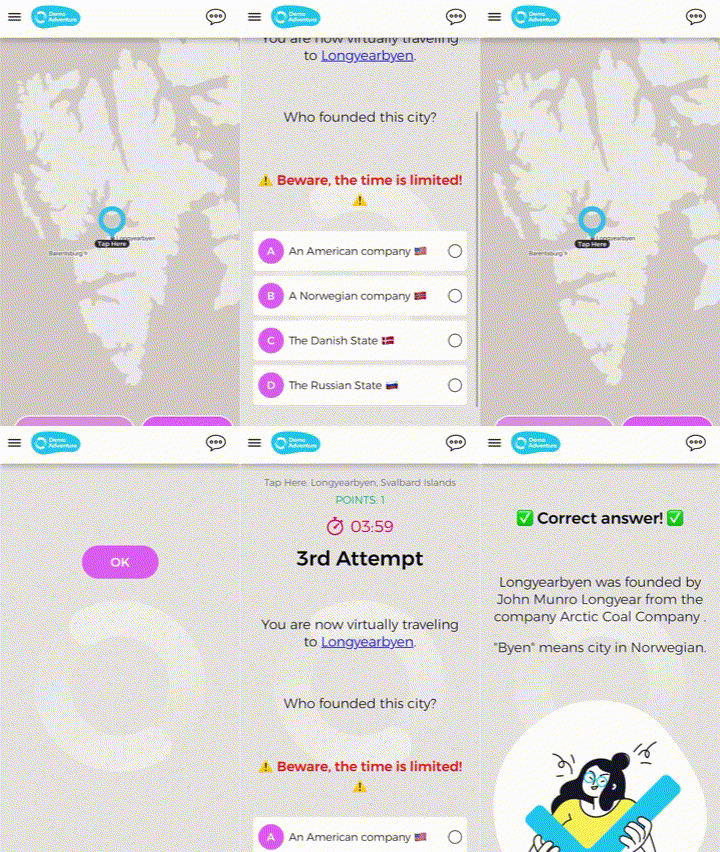
It works!
Related stories

With Loquiz, you can make a game interact with the real world in many ways (such as the activity station or a...

You run an event, and then you want to quickly make a slideshow at the end of it. But you...
You’re about to host an event, and you have a few facilitators for some activities. Here’s a great thing to...
Start free trial to bring your ideas to life
Sign up and create games, tours, team events and educational content that captures peoples' attention
Start from the scratch or use templates to kickstart!
