

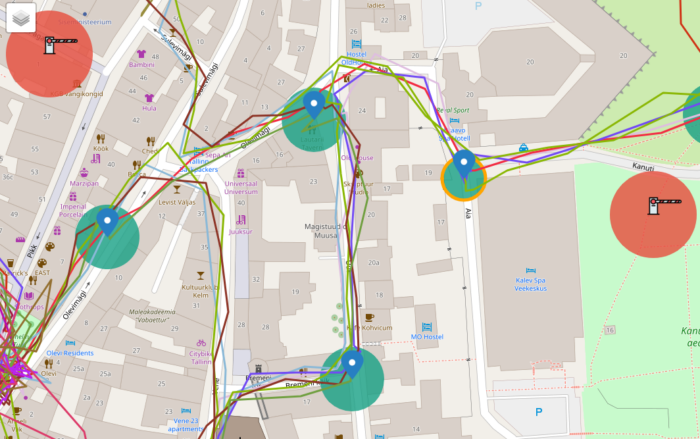
Today we changed the tracking interface in event results. The Team track is now updated in every 20 seconds or so. There are few things to keep in mind.
- The track is displayed on the results pages map interface.
- The track is updated separately from other communication so tracking does not affect the distance calculations or game time. These are updated only when the team answers.
- Tracking starts when the team starts an event and tracking is stopped when the game ends.
The game end in Loquiz means that the team needs to be at the finish location. If the team does not visit a finish location then the tracking will continue. Tracking is not stopped by the game duration as often teams are coming to finish only after the game time runs out. - Tracking is stopped when the team EXITs the game in Loquiz application.
Tracking is activated by default, if you do not want to show the track, please untick the Map in Event Settings (Results tab).
Special considerations for playing on personal devices
When people are playing on their own devices, then they should follow the usual practicies, however if they want to stop playing they should be informed to exit the game to avoid the tracking to happen outside the game. Switching Loquiz off also means that the player is not tracked. If they keep Loquiz on or log into the game outside of the game, their location on the map interface is updated and shown. This only applies in cases when the game is not properly finished. If the team finishes the game properly, the tracking is stopped for this team.
NB! For older events the “question-to-question” track is not visible anymore as we are using “live tracking”. Older events appear without a track.
Related stories
How to set up an Halloween game now Halloween is in a week! If you need a game that’s easy...

We can sell Loquiz City games through ticketing platforms. The flow is simple: players visit your website, purchase one or...
When we offer a city game, our players expect some interaction with their surroundings. Sometimes, this is essential because the...
Start free trial to bring your ideas to life
Sign up and create games, tours, team events and educational content that captures peoples' attention
Start from the scratch or use templates to kickstart!
