


You have a Loquiz game, and you want the simplest leaderboard that will show only ranking, team names, and scores? Here’s one page made from Vibe Coding. Using an LLM such as ChatGPT, you can easily make this page yourself. Have a look at it:
Simple leaderboard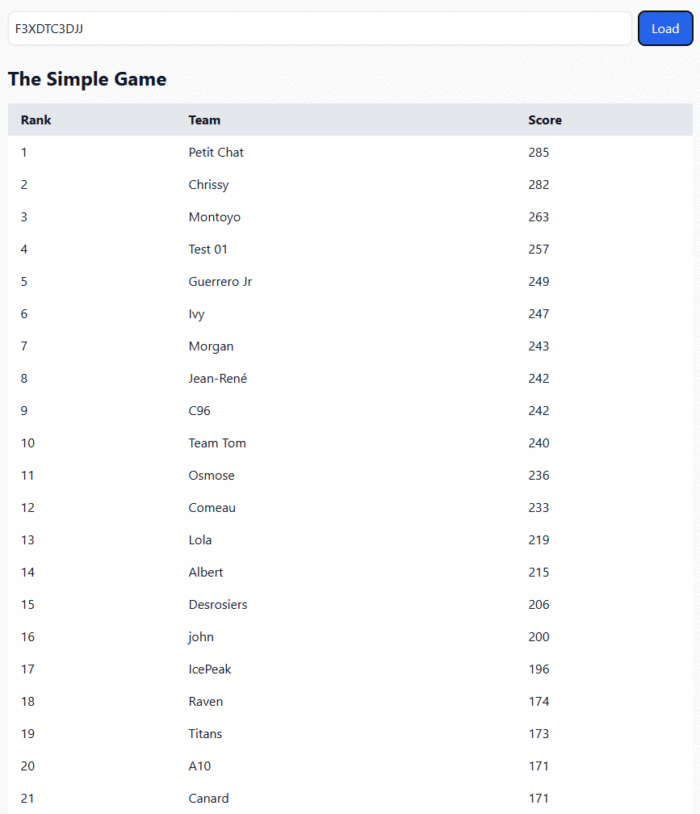
Feel free to try any of your game’s ID. You can also try with game ID F3XDTC3DJJ.
How to make it yourself?
In fact, it’s easy to recreate such a result page using Vibe-Coding. Just go to your favorite LLM (e.g. ChatGPT, Copilot, or Gemini), then copy and paste the following prompt and attach this .txt file:
Use the attached api-for-llms.txt file to get instruction on how to fetch Loquiz results data and build me a simple HTML result page that shows team name and score only. Fetch the results from
loquiz after I have submitted game id.
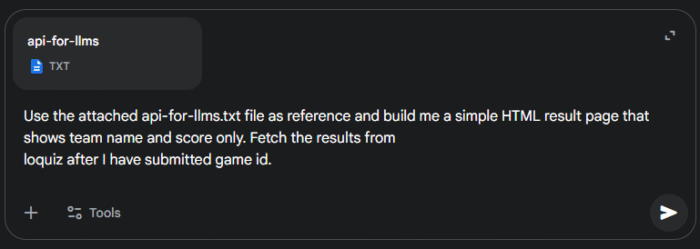
If you want something a bit more specific, you can add instructions at the end of the prompt. For instance: “Include a dark/light mode” or “Show the playtime for each time”. Be as specific as possible. You can also ask to edit different elements after the AI has generated the code.
Let me know what you think of it! If you have any idea of a custom results page, feel free to send me an email.
Related stories

You’re building a self-guided tour, and you’d like to increase the immersion? The music is one of the important aspects...

With your Loquiz game, you can add a list to simply display your tasks. It’s recommended for indoor games or...
The Loquiz creator allows you to have a map… But also a custom visual interface called “Playground“. This feature allows...
Start free trial to bring your ideas to life
Sign up and create games, tours, team events and educational content that captures peoples' attention
Start from the scratch or use templates to kickstart!
