

You’d like to create a tour in your own city, and you need a template? We’ve created the “Simple tour” template. In this tool, you’ll just need to move all the pins to your location, then add tasks related to your location.
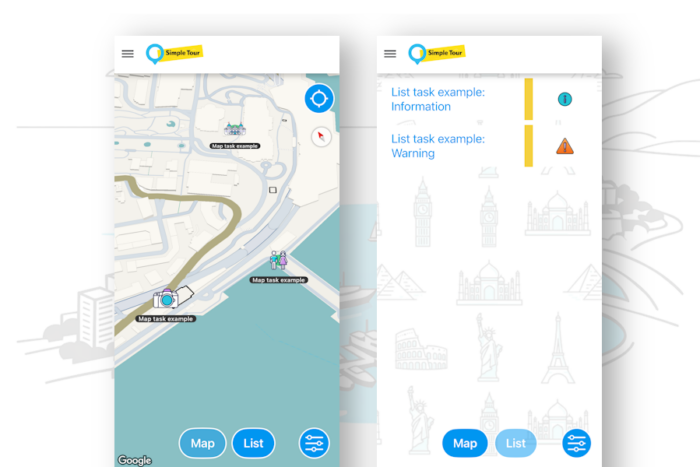
This simple tour tool displays a map and a list. The map includes tasks accessible by GPS. The list shows tasks accessible anytime by the tour user.
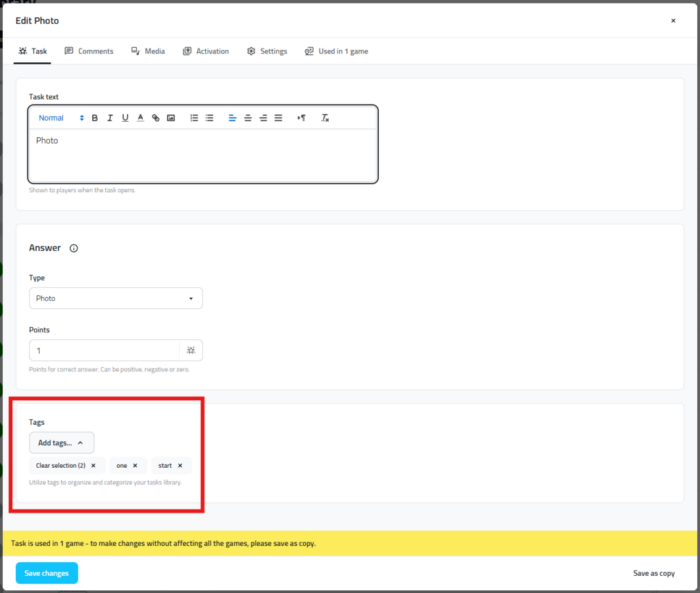
You can add more by yourself. If you add the tag “map”, then they’ll appear on the map. Same story for the tag tasks. Here we explain how to add tags to a task.
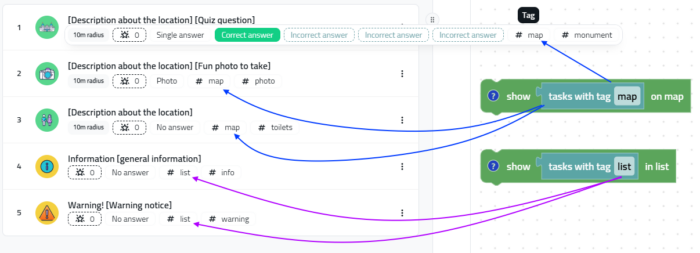
On this support page, we explain how to add tags to tasks. If you add “map” and “list” tags, they’ll appear in the game thanks to the logic.
To create a Simple Tour game in your Loquiz account, just click here. If you don’t have a Loquiz account, you can create one for free here.
If you have any questions on how to set up a tour at your own location, you can always contact me!
Related stories

Do you remember the iBeacons? They were trendy back in 2015. Shops, museums, and stadiums used this wonderful piece of...

An outdoor escape game for your event Summer is coming, and more customers are requesting outdoor games. We have you...

As of today, the Loquiz app and platform do not support the iBeacon feature anymore. If you have a game...
Start free trial to bring your ideas to life
Sign up and create games, tours, team events and educational content that captures peoples' attention
Start from the scratch or use templates to kickstart!
