

When you develop a Loquiz game, you need to spend at least 2/3 of your time testing and improving your game.
With Loquiz, you can easily generate a test version of your game and share it with anyone. Your internal team will try it, just as you can let your remote clients experience your game.
Additionally, you can play a game in test mode as many times as you want: The system won’t charge you anything for this.
To create a game test, go to the game editor. Click on the “Test” tab. Just scan the QR code, and you’re ready to test your game!
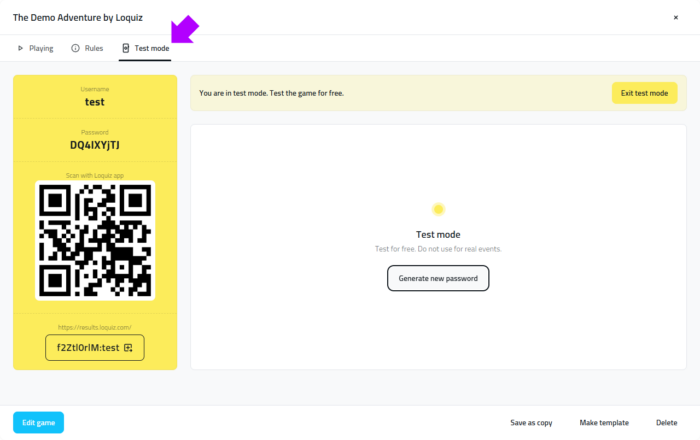
There’s no need to log in to your account to test the game.
With the QR code, anyone can access. For example, your prospects or external facilitators may test it and explore the game.
Testing is an important test to ensure that the game is ready for the D-Day of the event.

When you try the test mode, you’ll notice the red “TEST” in the header and the answers in the footer. Moreover, you have access to a fake GPS feature. Learn more about the Test mode in this FAQ article.
If you have any questions/feedback on the test mode, feel free to send me a message.
Related stories
When we offer a city game, our players expect some interaction with their surroundings. Sometimes, this is essential because the...

When we build an outdoor Loquiz game, we often set a series of tasks on the map. Players activate the...

Since 2020, companies have increasingly requested remote events. However, we still want a bit of human presence. Perhaps we can’t...
Start free trial to bring your ideas to life
Sign up and create games, tours, team events and educational content that captures peoples' attention
Start from the scratch or use templates to kickstart!
