

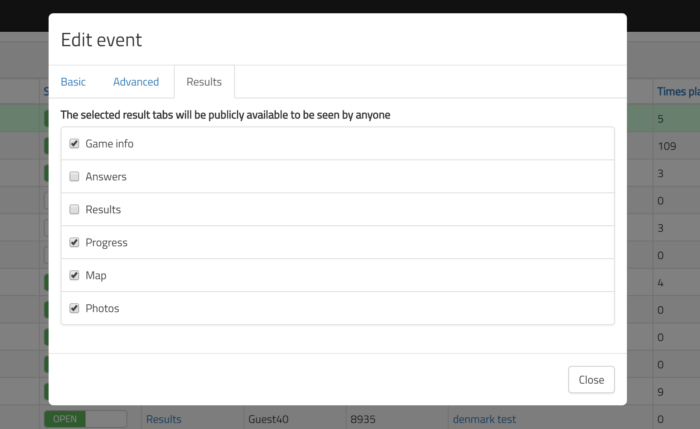
In case you have ever worried that if you share your results screen with wider public, they will see the correct answers then now there is a solution.
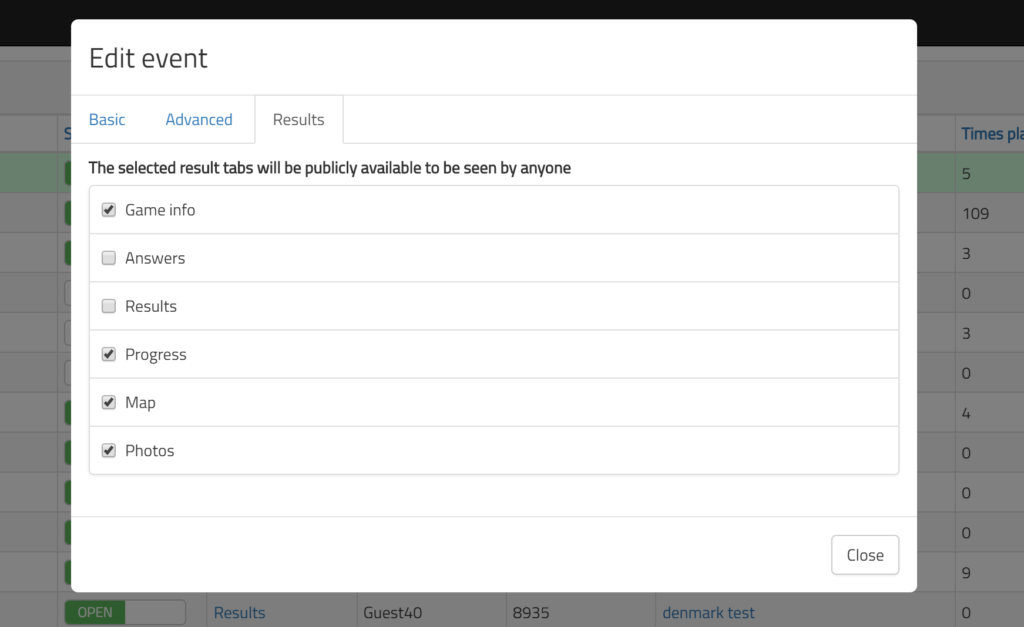
When creating or editing an event you can now choose what result pages are shown for every specific event. Default is that all the pages are shown, but you can limit the pages so that you do not show the correct answers and game info for example. This affects all users that are not logged in to the PRO. In case you are logged in and navigate to Results pages you can still see all the available pages.
So if you have limited events result pages and want to see hidden page you need to log into the PRO for that.
Related stories
With your Loquiz game, you can add a list to simply display your tasks. It’s recommended for indoor games or...
The Loquiz creator allows you to have a map… But also a custom visual interface called “Playground“. This feature allows...

Do you live in a well-known city, and you’d like to offer tourists a mobile phone tour? They will appreciate...
Start free trial to bring your ideas to life
Sign up and create games, tours, team events and educational content that captures peoples' attention
Start from the scratch or use templates to kickstart!
