


Navigation to the location of the pins with Loquiz has just gotten a backup by Google Maps or Apple Maps.
What does it mean?
If you play a map-based outdoor game with pins, then tapping on a pin opens an option to select “Navigate to.” Clicking on “Navigate to” opens your device’s default map’s app with the calculated route. The player just needs to start with navigating and when arrived, switch back to the Loquiz app.
A picture is worth a thousand words, so here’s a visualization of how to benefit from Google and Apple Maps in-game.
How to set the “Allow navigation” on the Loquiz platform:
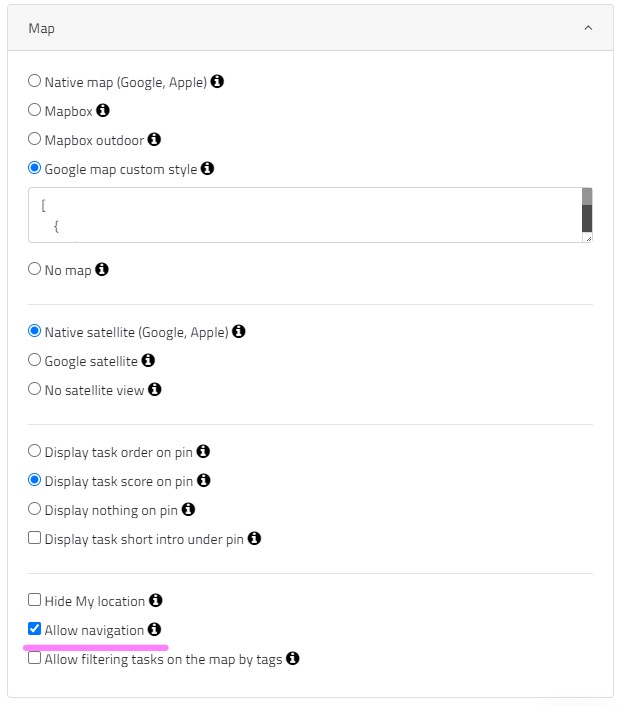
And this is how the player is experiencing it:
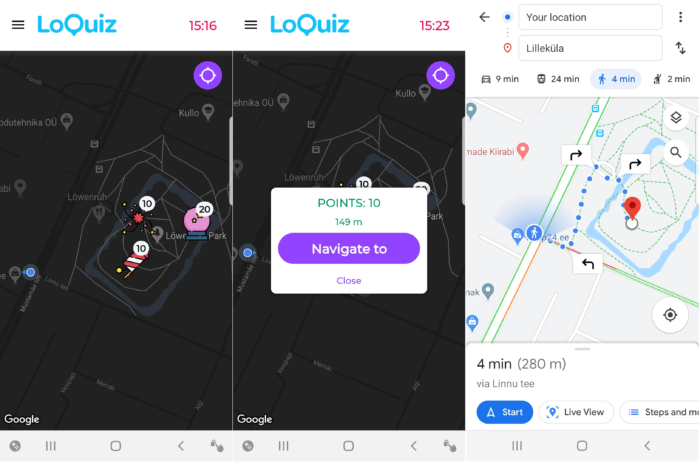
Also, check out what other Navigation apps we have released in 2020: https://loquiz.com/2020/07/22/features-released-in-the-first-half-of-2020/
Related stories

With Loquiz, you can make a game interact with the real world in many ways (such as the activity station or a...

You run an event, and then you want to quickly make a slideshow at the end of it. But you...

You’re about to host an event, and you have a few facilitators for some activities. Here’s a great thing to...
Start free trial to bring your ideas to life
Sign up and create games, tours, team events and educational content that captures peoples' attention
Start from the scratch or use templates to kickstart!
