


Loquiz app is available in several languages and you can easily create personal language packs if needed. This means that all the buttons, menus etc in the app are in your own language. It also makes the app very flexible if you want to use your own personalized versions of already available languages. You can even translate the app into any other game-themed language like a Pirate or Old English. (Check out the site like https://lingojam.com/EnglishtoShakespearean for inspiration. )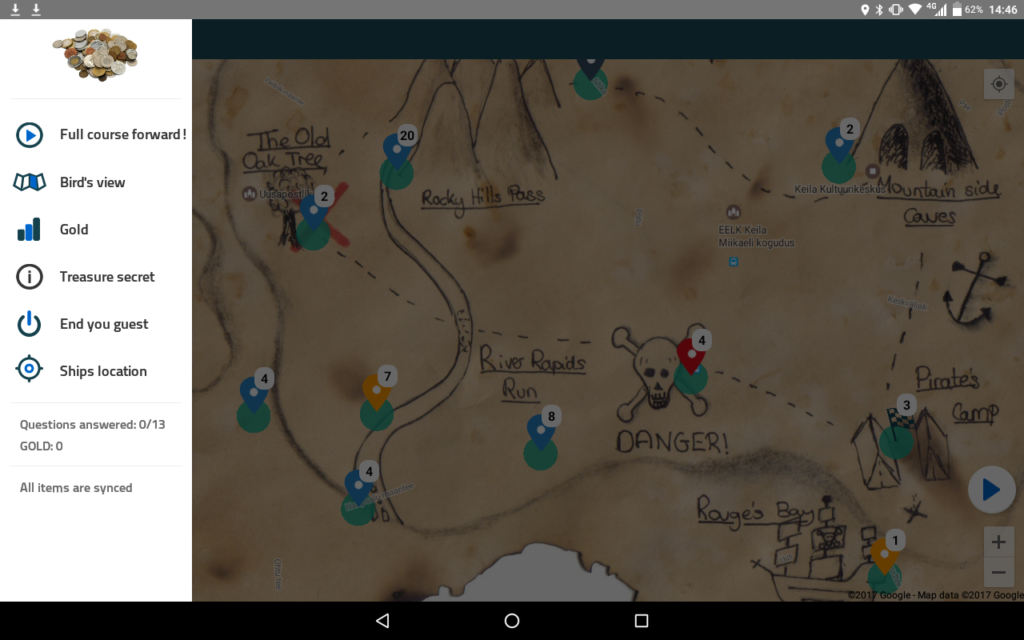
To get started with creating a language, go to upper right corner, click to an open drop down menu and choose Languages. There you can click “New”.
Name your language and choose the base language you want to translate from. Then just start filling out the fields. You do not have to translate everything. For example, you can create your own version of the existing English, translating only buttons you prefer to change.
PS! You can enable which languages can be chosen on your account when creating questions or setting a game language on its configuration page. You can add and remove visible languages from Menu->Account settings ->Preferences->Languages.
Now you are ready to try out your new language in a game! Always test the new language with the game to make sure the text fits the screen and translations make sense for the player.
Related stories

How to set up an Halloween game now Halloween is in a week! If you need a game that’s easy...

We can sell Loquiz City games through ticketing platforms. The flow is simple: players visit your website, purchase one or...

When we offer a city game, our players expect some interaction with their surroundings. Sometimes, this is essential because the...
Start free trial to bring your ideas to life
Sign up and create games, tours, team events and educational content that captures peoples' attention
Start from the scratch or use templates to kickstart!
